| Return shipping will be paid by | Seller |
|---|---|
| All returns accepted | Returns Accepted |
| Item must be returned within | 30 Days |
| Refund will be given as | Money Back |
| Brand | Cisco |
| Type | UC Phone KEY EXPANSION MODULE |
| Model | 68-3117-02 |
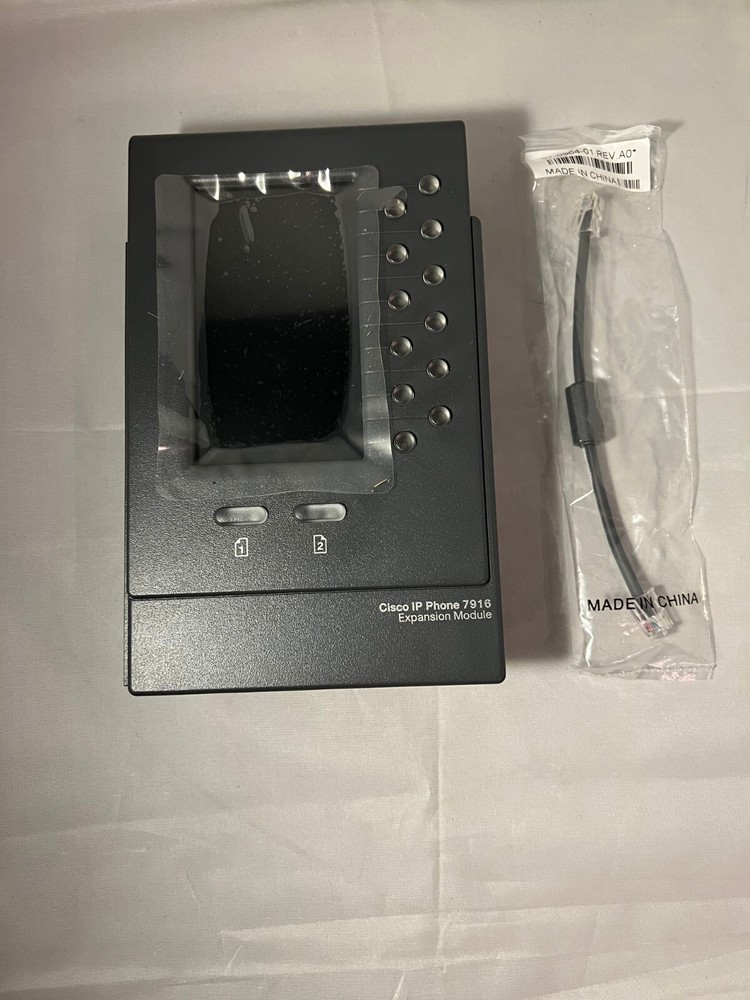
Check the listing for details. Cisco IP Phone 7916 Expansion Module. Condition: New. Listed at 29.00 USD. Cisco IP Phone 7916 Expansion Module Cisco® Unified Communications is a comprehensive IP communications system of voice, video, data, and mobility products and applications. It enables more effective, more secure, more personal communications that directly affect both sales and profitability. It brings people together by enabling a new way of communicating — where your business moves with you, security is everywhere, and information is always available...whenever and wherever it is needed. Cisco Unified Communications is part of an integrated solution that includes network infrastructure, security, mobility, network-management products, lifecycle services, flexible deployment and outsourced management options, end-user and partner financing packages, and third-party communications applications.The power of the Cisco Unified Communications family of products extends throughout the enterprise by delivering powerful, converged voice solutions with the new Cisco Unified IP Phone Expansion Module 7916 extending capabilities to wideband audio phones (Figure 1).Figure 1. Cisco Unified IP Phone Expansion Module 7916Product OverviewCall coverage is a critical capability for administrative assistants and others who must monitor, manage, and cover the status of calls. This capability requires the ability to instantly determine the status of numerous lines beyond the six-line capability of the Cisco Unified IP Phone 7962G and 7965G models and eight-line capability of the Cisco Unified IP Phone 7975G.The Cisco Unified IP Phone Expansion Module 7916 extends the capabilities of the Cisco Unified IP Phone 7962G, 7965G, and 7975G models with additional buttons and an LCD display. With this expansion module, you add 12 physical keys with access to 12 additional keys through the page keys for a total of 24 buttons to the existing 6 buttons of the Cisco Unified IP Phone 7962G and 7965G (Figure 2) models and the existing 8 buttons of the Cisco Unified IP Phone 7975G. You can use up to two Cisco Unified IP Phone Expansion Module 7916 modules (Figure 3) with the Cisco Unified IP Phone 7962G, 7965G, and 7975G models.Figure 2. Cisco Unified IP Phone 7975G with One Cisco Unified IP Phone Expansion Module 7916Figure 3. Cisco Unified IP Phone 7975G with Two Cisco Unified IP Phone Expansion Module 7916 Modules Features and BenefitsThe large LCD display of the Cisco Unified IP Phone Expansion Module 7916 allows for quick and easy identification of associated buttons. Using the Settings menu of the Cisco Unified IP Phone 7962G, 7965G, and 7975G models, you can adjust the brightness of the individual LCDs for these phones and the Cisco Unified IP Phone Expansion Module 7916 according to your preference. You can program the buttons on each Cisco Unified IP Phone Expansion Module 7916 as a directory number, line key, or speed-dial key, much like on the Cisco Unified IP Phone 7962G, 7965G, and 7975G models. Buttons used as a directory-number (DN) or shared line keys are illuminated, allowing easy identification of call state (Table 1).Table 1. Illuminated ButtonsButtonLine StatusOff (dark)Line availableGreen, steadyLine in useRed, steadyLine in use by someone elseAmber, flashingLine ringingGreen, flashingCall is on hold These capabilities provide features that are similar to typical Direct Station Selection/Busy Lamp Field (DSS/BLF) modules but are not intended to be directly comperable to traditional DSS/BLF modules. The Cisco Unified IP Phone Expansion Module 7916 is not an operator or attendant console. The primary function of this module is to provide the Cisco Unified IP Phone 7962G, 7965G, and 7975G models with additional keys for features such as speed dial or directory numbers. The illuminated buttons provide ease of line status, making the Cisco Unified IP Phone Expansion Module 7916 an ideal call-coverage tool.The two illuminated page buttons beneath the display of the Cisco Unified IP Phone Expansion Module 7916 allow you to shift between the first and second pages of 12 buttons, providing access to all 24 keys, 12 at a time (Table 2). Table 3 lists the features of the Cisco Unified IP Phone Expansion Module 7916.Table 2. Illuminated Page ButtonsButtonPage StatusOff (dark)Page not in focusGreen, steadyPage in focusAmber, flashingPage not in focus with one or more alerting or on-hold calls present on page Table 3. Features and DescriptionFeatureDescriptionGraphical display4.3” graphical (TFT) color display, 16-bit color depth, 480 x 272 effective pixel resolution, with backlight. The display also supports localization requiring double-byte Unicode encoding for fonts.Directory-number and feature buttonsThe module has 12 physical buttons (24 with page key).Page buttonsThe two Page buttons are used to access each page of 12 buttons and provide phone status.Sleep or inactivity modeWhen Cisco Unified IP Phone 7965G or 7975G models are in power-saving sleep or inactivity mode, the Cisco Unified IP Phone Expansion Module 7916 is also in sleep or inactivity mode. In addition to the Display button, any button on the Cisco Unified IP Phone Expansion Module 7916 that is pressed will cause the displays to awaken. The inactivity period is configured by the system administrator.Software RequirementsTable 4 lists the software requirements for the Cisco Unified IP Phone Expansion Module 7916.Table 4. Cisco Unified IP Phone Expansion Module 7916 Software RequirementsSpecification DescriptionPhone software requirements8.3(5) and laterCall-control compatibilityCisco Unified Communications Manager 4.2(3) SR3a, 4.3(2), 5.1(3)b, 6.1(1), 7.0, 7.1 and later; Cisco Unified Communications Manager Express 4.3/7.0 and later. Cisco Unified Survivable Remote Site Telephony (Unified SRST) 4.1 (IOS 12.4.15T) and later.Signaling protocolsSkinny Client Control Protocol (SCCP) Software 8.3(5) and laterSession Initiated Protocol (SIP) Software 8.4(1) and later The Cisco Unified IP Phone Expansion Module 7916 allows for 48 additional buttons (with two modules), but the number of buttons depends on the Cisco Unified Communications Manager and Cisco Unified Communications Manager Express Release, as listed in Table’s 5 and 6.Table 5. Cisco Unified IP Phone Expansion Module 7916 Button Support (SCCP)Call-Control Release Total Number of Buttons SupportedCisco Unified IP Phone 7962G and 7965G ModelsCisco Unified IP Phone 7975GCisco Unified Communications Manager 4.2(3)SR3a, 4.3(2), 5.1(3)b, and 6.1(1)4242Cisco Unified Communications Manager 7.1(3) / Cisco IP Phone Firmware 8.5(3) and later5456Cisco Unified Communications Manager Express 4.3/7.0 and later5456 Table 6. Cisco Unified IP Phone Expansion Module 7916 Button Support (SIP)Call-Control Release Total Number of Buttons SupportedCisco Unified IP Phone 7962G and 7965G ModelsCisco Unified IP Phone 7975GCisco Unified Communications Manager 7.0 and 7.13636Cisco Unified Communications Manager 7.1(3) / Cisco IP Phone Firmware 8.5(3) and later5456Cisco Unified Communications Manager Express 4.3/7.0 and later5456Hardware Requirements● Cisco Unified IP Phone 7962G, 7965G, and 7975G models● Cisco Unified IP Phone Expansion Module 7916 (CP-7916=)◦ The maximum is two modules (connecting cable supplied with each Cisco Unified IP Phone Expansion Module 7916)● Footstand is required; single (CP-SINGLFOOTSTAND=) or double (CP-DOUBLFOOTSTAND=) (required items for double Cisco Unified Expansion Module installation shown in Figure 4).◦ Replacement of the standard Cisco Unified IP phone footstand is required. The standard footstand is replaced with a two-piece footstand specifically designed to support the Cisco Unified IP Phone Expansion Module 7916. Two footstands are available: a single footstand when one Cisco Unified IP Phone Expansion Module 7916 is used and a double footstand when two Cisco Unified IP Phone Expansion Module 7916 modules are used.◦ The only tool required for installation of the Cisco Unified IP Phone Expansion Module 7916 is a flat-blade screwdriver or other appropriate tool to unlatch the pins securing the footstand to the Cisco Unified IP Phone 7962G, 7965G, and 7975G models.● Power cube (CP-PWR-CUBE-3=) and cord (CP-PWR-CORD-xx=) to supply local powerTable 6 gives power options for the Cisco Unified IP Phone Expansion Module 7916.Figure 4. Required Items for Double Cisco Unified IP Phone Expansion Module InstallationTable 7. Power RequirementsNumber of Cisco Unified IP Phone Expansion Module 7916 ModulesCisco Unified IP Phone 7962G, 7965G, and 7975G Models Power SourceItems to Order1In-line1 Cisco Unified IP Phone Expansion Module 79161 single footstand1 power cube1 country cord1Local power (cube)*1 Cisco Unified IP Phone Expansion Module 79161 single footstand2In-line or local**2 Cisco Unified IP Phone Expansion Module 7916s1 double footstand1 power cube1 country cord* A single Cisco Unified IP Phone Expansion Module 7916 can receive power from a locally powered Cisco Unified IP phone.** Local power must be connected to the first Cisco Unified IP Phone Expansion Module 7916 to supply power to both Cisco Unified IP Phone Expansion Module 7916 modules. Tables 7 and 8 give specifications and temperature ratings, respectively, for the Cisco Unified IP Phone Expansion Module 7916.Table 8. Cisco Unified IP Phone Expansion Module 7916 Technical SpecificationsSpecification DescriptionDimensions (H x W x D)8.0 x 4.84 x 2.0 in.(203 x 123 x 51 mm)Weight 0.83 lb (376g)Power48 VDC, 58 mA maximum Table 9. Temperature RatingsTemperature Variable DescriptionOperating temperature32 to 104°F (0 to 40°C)Relative humidity10 to 95%Storage temperature12 to 140°F (–10 to 60°C)Certifications-Compliance and SafetyFor information about certifications, visit: http://www.cisco.com/univercd/cc/td/doc/product/voice/c_ipphon/english/ipp7960/iphrcsi3.htm.Ordering InformationTo place an order, visit the Cisco Ordering Home Page and refer to Tables 9 and 10. To download software, visit the Cisco Software Center.
You may also like


