| Restocking Fee | No |
|---|---|
| All returns accepted | Returns Accepted |
| Item must be returned within | 30 Days |
| Refund will be given as | Money Back |
| Return shipping will be paid by | Buyer |
| Brand | Dalsa |
| MPN | Does Not Apply |
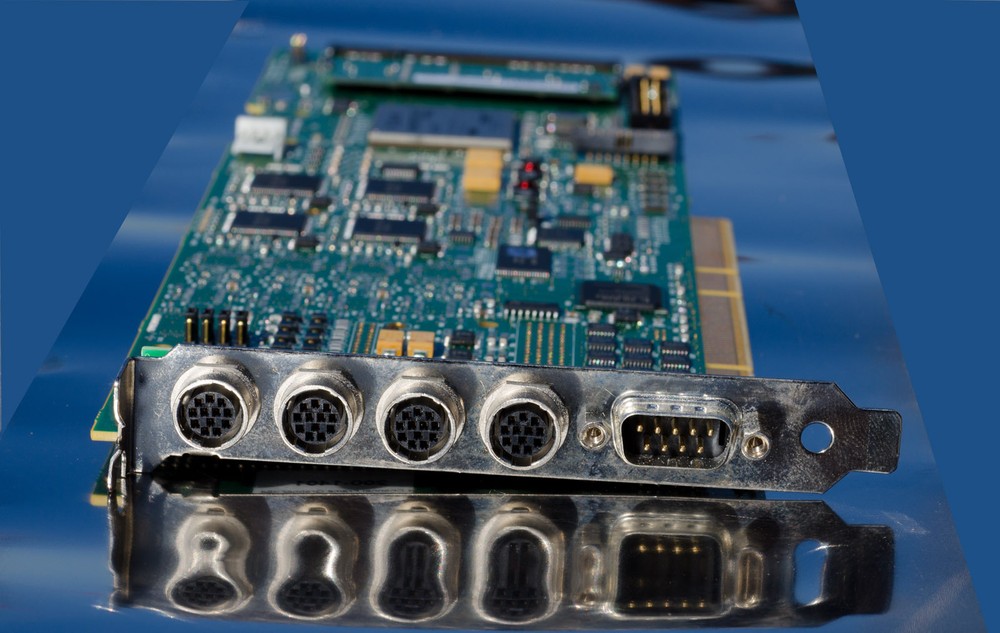
Check the listing for details. Dalsa X64-AN analog frame grabber. Condition: Used. Listed at 743.00 USD. Dalsa X64-AN analog frame grabber. PCI-X, but can also be used in regular PCI slot (bandwidth will be lower). Tested, works. Driver (32 and 64 bit for Windows XP/Vista/7) and Sapera LT software are available for free download from Dalsa web site. Measure your space in PC to be sure that it would fit: it's 340mm long with handle and 315mm without (pictured without handle but it is included). Works with standard NTSC/PAL cameras, and also with non-standard. I myself tested it with cameras like Adimec MX12P and Texas Instruments MC-1001PF (1000x1000px 15fps progressive). If Dalsa CamExpert application doesn't have settings file for your non-standard camera - you can make it yourself. For this you would need these figures: pixel clock, horizontal and vertical front porch - sync - back porch. You can find all or at least (pixel clock) some of these numbers in your camera datasheet. If your camera also have digital output connector - you can find and measure with multimeter (with frequency function) LVAL and FVAL (line and frame frequency). If you know LVAL: divide its time in microseconds by Pixel Clock time = total line pixels. Then subtract active line pixels (from datasheet) = total horizontal blanking pixels. Same, divide FVAL timing by LVAL = total lines per frame. Subtract active lines = total blanking lines. Blanking pixels/lines include front porch, sync and back porch pixels (or lines). You could try to guess - I used analog oscilloscope - that helped me. Here I added pictures of horizontal and vertical blanking. Took pictures of oscilloscope screen at 1/10sec exposure - pretty impossible without camera at lower (frame) frequencies. You can see these dots - these are actual lines - so you can count dot-lines for vertical front porch... then vertical sync... then vertical back porch............... If camera runs in interlaced mode - then these numbers (vertical blanking) should be divided by 2. If you have black border - on top or bottom or either side - try to subtract some blanking pixels/lines from back porch and add it to front porch (or other way).
You may also like