| Returns Accepted | ReturnsNotAccepted |
|---|
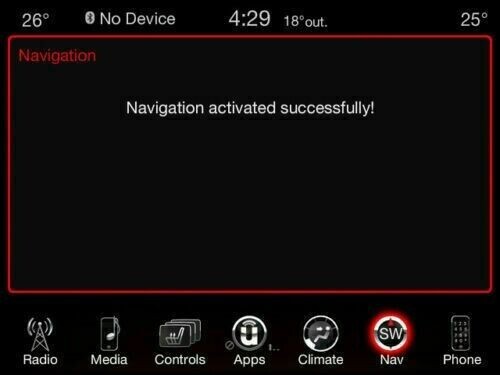
Check the listing for details. JEEP CHRYSLER DODGE RA3 navigation USA Uconnect 8.4 ACTIVATION CODE NAV unlock. Condition: New. Listed at 151.31 USD. JEEP RA3 navigation USA Uconnect 8.4 ACTIVATION CODE Chrysler Dodge NAV unlock (working with USA cars / not for European models) Please note: This is an Activation Code only. This will unlock the Navigation feature on your Uconnect 8.4A system. Once it is activated it can’t be removed, and is not refundable. The activation remains with the original vehicle, and can’t be transferred. Active your Uconnect Navigation system today! No delivery involved. Everything is done via email. The Uconnect 8.4A RA3 radio has a GPS navigation option that is pre-loaded on the system. You can activate your navigation feature anytime after your vehicle purchase, right here. This is a one time fee to activate and is valid for the life of your vehicle. Compatibility:Jeep: Cherokee 2014 – 2018 Grand Cherokee 2014 - 2016 Chrysler:200: 2015 - 2017300 2015 - 2016All-New Pacifica 2017 Dodge:Challenger 2015 - 2016Charger 2015 - 2016Durango 2014 - 2017Viper 2013 Ram: 1500 2013 - 20172500/3500 2013 - 20174500/5500 2013 - 2017Chassis Cab 2013 - 2017 As well as Fiat and Lancia equipped with Uconnect 8.4 (VP3 and VP4) INSTRUCTIONS FOR ACTIVATING YOUR NAVIGATION SYSTEM 1. ACTIVATE YOUR NAVIGATION SYSTEM Locate the following three buttons on the Center Control Panel: A. Driver-side Temp Up B. Driver-side Temp Down C. Front Defrost Hold all three buttons simultaneously for five seconds. PLEASE NOTE: Button location may vary by vehicle. * see picture 5 and 6 in listing Select “VP3 Activate Navigation.” 1. Take a picture of the below screen and send it to us. 2. You will receive message from us with ACTIVATION CODE * see picture 7 in listing Select “OK” on the screen. * see picture 8 in listing 1. Enter the Activation Code exactly as sent to you,with the dashes. Then select “OK.” Congratulations, your navigation system is activated. You will see a “Nav” icon at the bottom of the screen. This means the system is available for use. PLEASE NOTE: It may take about 10 minutes of unobstructed satellite signal for the navigation system to be fully functional. You will also want to select the “Nav” icon twice to ensure your navigation system is activated. * see picture 9 in listing
You may also like