| Restocking Fee | No |
|---|---|
| Return shipping will be paid by | Buyer |
| All returns accepted | Returns Accepted |
| Item must be returned within | 30 Days |
| Refund will be given as | Money back or replacement (buyer's choice) |
| Sample volume | 0.3mL |
| Size | 130*55*25mm |
| Custom Bundle | No |
| Product Name | Alcohol Meter |
| MPN | 202301 |
| Rrange | 0~75% |
| Power supply | 2*AAA batteries |
| Refractometer Type | Handheld Refractometer |
| Modified Item | No |
| Weight | 100g |
| Intended Use/Discipline | Alcohol Meter |
| Brand | HFCCYBGS |
| Unit Type | Unit |
| Working Temperature | 20~25℃ |
| Model | PAL-109 |
| Measurement time | 3 seconds |
| Country/Region of Manufacture | China |
| Unit Quantity | 1 |
| Resolution | 1% |
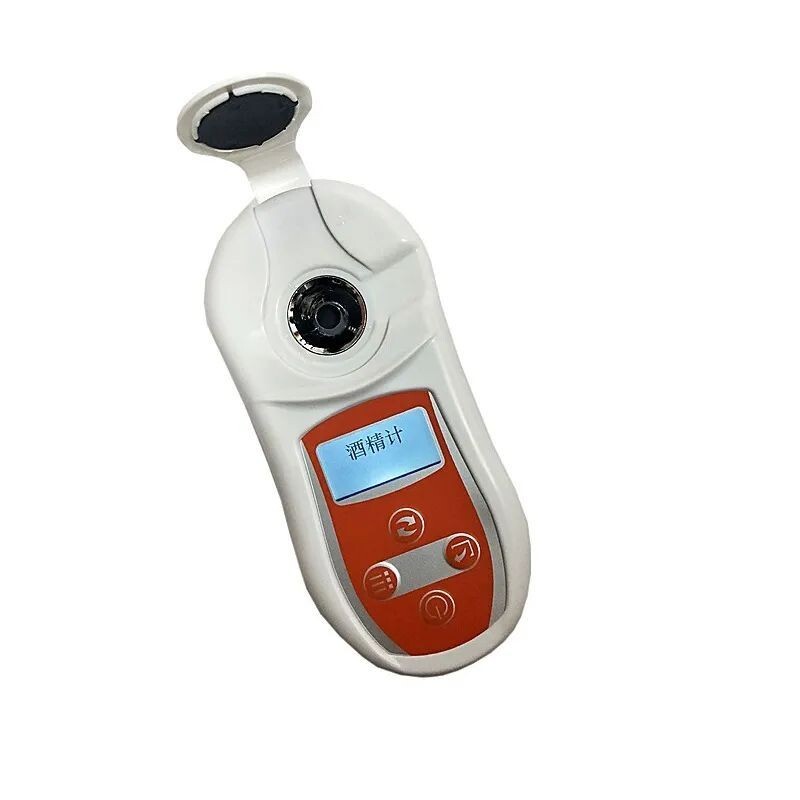
Check the listing for details. Portable Alcohol Meter Refractometer Measuring Range 0~75%. Condition: New. Listed at 80.00 USD. Product Description▲Product Name:Alcohol Meter▲Model:PAL-109▲Measuring range: 0~75% Temperature: 20~25℃▲Resolution: 1% Temperature: 1℃▲Sample volume: 0.3mL▲Measurement time: 3 seconds▲Power supply: 2*AAA batteries 1.5V (not included)▲Size: 130*55*25mm▲Weight: 100gTest samples1. Turn on the machine and enter the waiting measurement interface directly.2. Clean the prism surface with clean water.3. Drop 0.3ml of the sample to be tested into the measuring cell (about 2/3 of the depth of the sampling cell).4. Press the "Reading Confirmation" key to measure and display the measured value.5. To measure another sample to be tested, first clean the measuring cell and repeat steps 3.2-3.4.6. After use, clean the measuring cell with clean water, and then dry it with soft paper or cloth.Reminder: Do not use a metal spoon when adding the sample to the measuring cell to avoid scratching the prism surface. If the temperature of the sample is different from that of the prism surface, the sample should be placed in the measuring cell for a period of time before measuring.Zero Calibration1. If the value of the instrument is not zero when measuring pure water, please perform zero calibration.2. Prepare distilled or purified water.3. Clean the prism surface.4. Drop 0.3ml of pure water into the measuring cell (about 2/3 of the depth of the sampling cell).5. Select Calibration in Settings, press Enter to enter Calibration, and wait for the reading to appear.6. If "Calibration complete" is displayed, it means that the zero calibration is successful.7. If "Calibration Error" is displayed, it means calibration failed. A possible cause is calibration with inappropriate zero water.8. After the zero calibration of the instrument is completed, the display shows 0.0%; wipe the water on the prism with lens tissue, and then the sample to be tested can be measured.
You may also like