| Restocking Fee | No |
|---|---|
| Return shipping will be paid by | Seller |
| All returns accepted | Returns Accepted |
| Item must be returned within | 30 Days |
| Refund will be given as | Money Back |
| Features | Active Noise Cancellation |
| Microphone Type | Single Piece Only |
| MPN | SM-R170 |
| Unit Type | Unit |
| Manufacturer Color | Black , White, Silver, Yellow |
| Country/Region of Manufacture | China |
| Model | Galaxy Buds |
| Number of Earpieces | Single Piece Only |
| Form Factor | In-Ear Only |
| Connectivity | Bluetooth |
| Wireless Technology | Bluetooth |
| Unit Quantity | 1 |
| Model Identifier | B07NLLLXNX B07Y7FX6LX B07NLMJ9KY |
| Brand | Samsung |
| Color | Black Charging Case |
| Type | Headset |
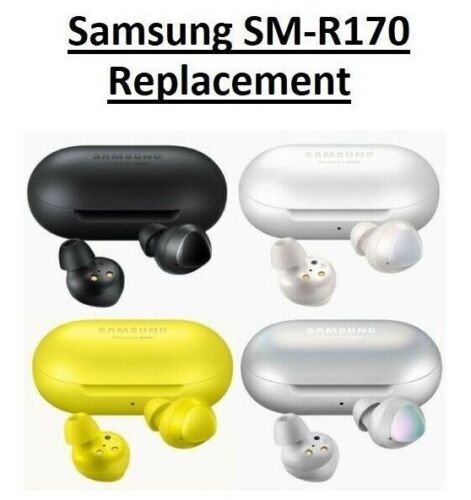
Check the listing for details. Samsung Galaxy BUDS R170 Replacement Bluetooth Wireless LEFT RIGHT Charging Case. Color: Black Charging Case, Condition: Open box. Listed at 14.99 USD. ORIGINAL SAMSUNG GALAXY BUDS REPLACEMENT EARBUDSMODEL : SM-R170 Condition:The units in this sale are being sold as open box condition. That means that they have been opened due to being a photo sample, a tested good customer return or having damaged packaging.- cleaned sanitized. Contains all original parts. Condition can range from Good to Excellent, with either light marks of previous use, or none. How to Buy:Please make your selection using the dropdown menu above. For example if you select the "Mystic Black Left Earbud" from the menu, ONLY that one earbud will be shipped. You can always add to cart, go back to the listing and add additional items. What's Included:Accessories such as booklets, wingtip replacements, USB cables and so on are NOT included. Your selected item ONLY. Instructions:To pair Samsung Buds please do the following :1. Make sure both earbuds and case are charged above 80 percent.2. Open case and press both buds down while still in the case with the case lid open. Do this for about 1 minute and you will see the indicator light flash green then red.3. Close the case and leave the buds inside the case for about 3 to 5 minutes.4. Take the buds out of the case and they will be synced.5. If still not paired you might have to repeat this process. Sometimes it might take a few tries to sync and pair In some cases You will need to Update the Firmware on your set or the replacement, to so this you will need a Samsung Device or any Device, that can run the Samsung Wearable App. Note for Non Samsung device users, you may need a Samsung device that has the Samsung Wearable App or which you can Download and use the Samsung Wearable App on to. This can be a Samsung Tablet, Phone or even Laptop or Netbook, or any device that supports Samsung Wearable App. If there are any other issues with pairing/ syncing/ coupling the buds to your set, pleas contact us, we have more detailed instructions through a link.
You may also like