| Restocking Fee | 20% |
|---|---|
| Return shipping will be paid by | Buyer |
| All returns accepted | Returns Accepted |
| Item must be returned within | 30 Days |
| Refund will be given as | Money back or replacement (buyer's choice) |
| Model | TR-1-NK-HE-P |
| Country/Region of Manufacture | United States |
| Type | Hydraulic |
| MPN | TR-1-NK-HE-P |
| Brand | tara Systems |
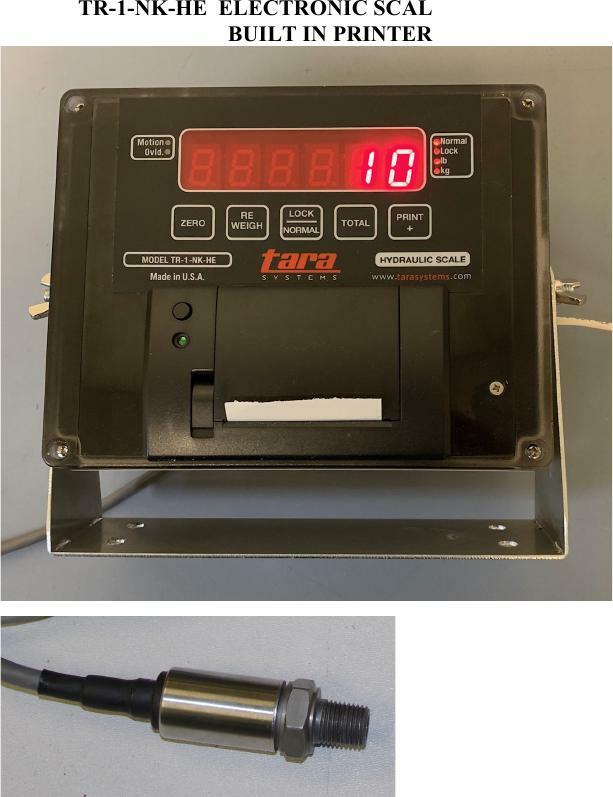
Check the listing for details. tara System Forklift / Loader Hydraulic Scale System/Thermal Printer,Sensor, New. Condition: New. Listed at 1445.00 USD. Model TR-1-NK-HE hydraulic weighing system Built in receipt thermal printer Forklift / Loader Hydraulic, Made in USA Complete with Hydraulic Pressure Sensor and all wiringPreliminary Testing and Calibration: The system will weigh accurately only in the first stage on a truck that has multiple telescoping lift cylinders. A weighing height must be established and the best method to reach the weighing height must be determined. Setting zero, as well as weighing a load, must all be done in the same manner. Repeatability is the key to accurate weighments. We will use a method of lifting then lowering a few inches to the set height, but if lifting to the height without lowering gives better results, then do it that way. You will need to have a known weight available that is evenly distributed The weight should be at least 40% of the lifts capacity, but if it is not available, a lesser weight can be used. 1. Assure that the mast is not tilted, then raise the forks to aprox. 16 inches above ground level. NOTE: On loaders, the height should be at the height that would be used to load into a truck. 2. Use a piece of tape to make a mark on the mast and the carriage so the lift height can be seen and repeated easily by the lift operator. 3. Lower the lift back to the ground, then lift to aprox. 2 inches over the tape marks, then jog the lift down to the marks. 4. Press and hold the PRINT button in while turning the power on. 5. When the display shows ------ release the PRINT button. 6. Press and release the TOTAL button. 7. Press the ZERO button until the display shows zero. 8. Lower the lift and get the test load on the forks. 9. Lift the load to aprox. 2 inches over the tape marks, then jog the lift down to the marks. 10. Allow the pressure to settle for aprox. 5 seconds. 11. The weight display can be altered up or down by pressing and holding the TOTAL button to make the display go down, and holding the PRINT/+ button to make the display go up. 12. Use the PRINT and TOTAL buttons to make the display come as close to the test weight as possible without spending a lot of time. The weight display may be changing by itself due to hydraulic bleeding. 13. Turn the power OFF and then turn it back on. 14. The system is ready for repeatability testing. tinue to press the LOCK/NORMAL until the dashes stay on the display for a longer period of "T" fitting (not included) Full feature digital scale system for lowest cost. Made in U.S.A. at our San Diego plant. Complete system for any hydraulic lifting equipment. The unit has adjustable parameters for automatic weight capture and capture and add for front-end-loaders. Display modes for display of Current Load or Total Weight. Printer data output for recording each load and total.
You may also like